What Is Agile Development?
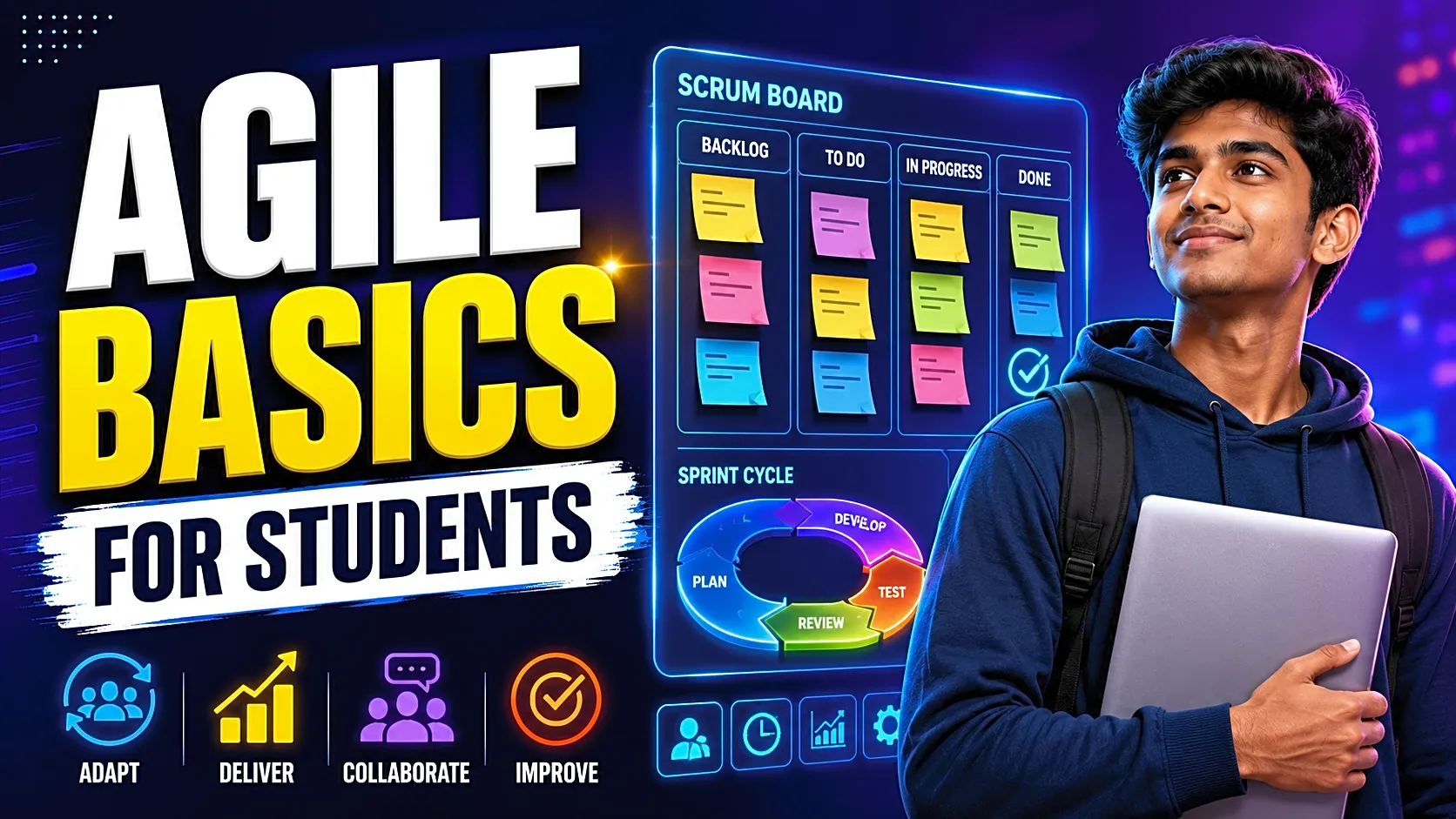
Agile development is a software development method where a project is planned, built, tested, reviewed, and improved in short cycles.
In simple words, Agile means:
Plan small. Build step by step. Test early. Take feedback. Improve continuously.
For a student project, Agile does not mean using complicated tools. It means creating a clear module list, dividing work into weekly sprints, tracking progress on a Kanban board, and showing working features regularly.
Why Agile Development Matters for Students
Final-year projects rarely stay exactly the same from start to end. Your guide may suggest a new module. Your team may change the UI. Your database may need extra fields. Testing may reveal errors in login, validation, or role-based access.
Agile helps you handle these changes without restarting the whole project.
For example, if you are building an Online Birth and Death Certificate System, you do not need to complete the full admin, manager, and user panel before testing. You can first build user registration, then application submission, then manager verification, then admin approval, and finally certificate generation.
This makes your project easier to manage and easier to explain.
Agile is helpful for students because it supports:
- Better module-wise planning
- Faster feature completion
- Early bug detection
- Clear team responsibility
- Regular documentation updates
- Stronger project report explanation
- Better viva preparation
Agile Manifesto in Simple Student Language
The Agile Manifesto focuses on people, working software, collaboration, and flexibility. For students, this means your team communication, working project demo, faculty feedback, and ability to improve the project matter more than blindly following a fixed plan.
Here is the student-friendly meaning:
1. People Over Tools
Do not depend only on Jira, Trello, Notion, or GitHub Projects. First, make sure every team member understands the project scope, modules, and responsibilities.
2. Working Software Over Heavy Documentation
Documentation is important for college submission, but it cannot replace a broken project. A beautiful report is not useful if the login page, database connection, or admin dashboard does not work.
3. Feedback Over Assumptions
Do not wait until the final week to show your project. After every major module, take feedback from your guide or faculty.
4. Flexibility Over Rigid Planning
If a feature needs improvement, Agile allows you to adjust the plan without damaging the entire workflow.
Agile vs Waterfall: Which Is Better for Student Projects?
|
Method |
Best For |
How It Works |
Student Example |
|
Waterfall |
Fixed requirements |
One phase is completed before the next phase starts |
First documentation, then design, then coding, then testing |
|
Scrum |
Team-based projects |
Work is completed in short sprints |
Complete login, dashboard, and CRUD modules in weekly sprints |
|
Kanban |
Simple task tracking |
Tasks move through To Do, Doing, Testing, Done |
Track UI, database, testing, report, and PPT visually |
Waterfall is easier to understand, but it becomes difficult when requirements change. Scrum is useful when your team wants sprint planning, roles, and reviews. Kanban is best for beginners because it visually shows what is pending, what is in progress, and what is complete.
For most student projects, a simple Scrum + Kanban combination works best.
Key Agile Terms Students Should Know
Sprint
A sprint is a short development cycle, usually one or two weeks, where selected tasks are completed. For example, Sprint 1 can include database setup, login, registration, and dashboard layout.
Product Backlog
The product backlog is the complete list of features your project needs. For a hostel management system, this may include room booking, fee payment, complaints, leave requests, attendance, notices, and reports.
Sprint Backlog
The sprint backlog is the smaller list of tasks selected from the product backlog for the current sprint.
User Story
A user story explains a feature from the user’s point of view.
Example:
“As a student, I want to submit a hostel complaint so that the manager can resolve it.”
Acceptance Criteria
Acceptance criteria are the conditions that prove a feature is complete.
Example acceptance criteria for complaint submission:
- Student must be logged in.
- Complaint form must include title, category, and description.
- Empty fields should show validation errors.
- Complaint status should be “Pending” after submission.
- Manager should be able to view the complaint.
This makes the user story testable instead of vague.
Sprint Review
A sprint review is a short meeting where the team checks what was completed and what can be shown as a working demo.
Retrospective
A retrospective happens after a sprint. The team discusses what went well, what went wrong, and what should improve in the next sprint.
Scrum Roles, Events, and Artifacts for Students
In real Scrum, there are defined roles, events, and artifacts. For student projects, you can simplify them.
|
Scrum Element |
Student-Friendly Meaning |
|
Product Owner |
The person who understands project requirements and priority |
|
Scrum Master |
The person who manages sprint flow and removes blockers |
|
Developers |
Team members who design, code, test, and document |
|
Sprint Planning |
Selecting tasks for the week |
|
Daily Stand-up |
Short progress discussion |
|
Sprint Review |
Showing completed work |
|
Retrospective |
Discussing improvements |
|
Product Backlog |
Full feature list |
|
Sprint Backlog |
Weekly selected tasks |
|
Increment |
Working feature completed in a sprint |
Even if your college team has only two or three students, assigning these responsibilities makes execution more organized.
How to Use Agile in a Final-Year Project
Step 1: Define the Project Goal
Write one clear sentence explaining your project.
Example:
“This project helps users apply for birth and death certificates online and allows managers/admins to verify, approve, and generate certificates.”
Step 2: List All Main Modules
Break the project into clear modules:
- User registration and login
- Admin dashboard
- Manager dashboard
- Application submission
- Document upload
- Verification workflow
- Certificate generation
- Reports and settings
Students who are still selecting a topic can explore final year project ideas before preparing the backlog.
Step 3: Convert Modules Into User Stories
Avoid vague tasks like “make admin panel.” Write clear user stories:
|
Module |
User Story |
|
User login |
As a user, I want to log in securely so that I can access my dashboard. |
|
Application tracking |
As a user, I want to track my application status so that I know whether it is pending or approved. |
|
Manager verification |
As a manager, I want to verify submitted documents so that incorrect applications can be rejected. |
|
Admin approval |
As an admin, I want to approve verified applications so that certificates can be generated. |
Step 4: Create a Kanban Board
Create four simple columns:
To Do → In Progress → Testing → Done
Add each feature as a task card. For beginners, this is enough. You can use a notebook, Excel sheet, Trello, Notion, Jira, or GitHub Projects.
Step 5: Plan Weekly Sprints
Select realistic tasks for each week. Do not overload Sprint 1 with the complete project.
|
Sprint |
Duration |
Tasks |
Output |
|
Sprint 1 |
Week 1 |
Requirement analysis, database design, login setup |
Project base ready |
|
Sprint 2 |
Week 2 |
User panel, registration, profile module |
User workflow ready |
|
Sprint 3 |
Week 3 |
Admin CRUD, manager module |
Backend control ready |
|
Sprint 4 |
Week 4 |
Main project feature implementation |
Core system ready |
|
Sprint 5 |
Week 5 |
Testing, bug fixing, screenshots |
Demo-ready project |
|
Sprint 6 |
Week 6 |
PPT, viva preparation, final report |
Submission-ready project |
Step 6: Test Small Features Immediately
A feature is not complete just because the code is written. Test it.
For login, test:
- Correct username and password
- Wrong password
- Empty fields
- Session logout
- Role-based redirection
- SQL/database errors
This habit improves both source code quality and report testing tables.
Step 7: Update Documentation Every Week
Do not wait until the final week to write your report. Update your module description, diagrams, screenshots, test cases, implementation details, and limitations as the project grows.
Students preparing formal documentation can connect this workflow with a B.Tech final year project report structure.
Sample Agile Sprint Log for Students
|
Sprint |
Module |
User Story |
Status |
Testing Done |
Improvement |
|
Sprint 1 |
Login |
As a user, I want secure login |
Done |
Valid/invalid login tested |
Added session logout |
|
Sprint 2 |
Application Form |
As a user, I want to submit an application |
Done |
Form validation tested |
Added required field messages |
|
Sprint 3 |
Manager Verification |
As a manager, I want to verify documents |
In Progress |
Pending |
Add reject reason field |
|
Sprint 4 |
Admin Approval |
As an admin, I want to approve verified requests |
To Do |
Pending |
Plan certificate generation |
This sprint log can be added to your project report or PPT to show that Agile was actually followed.
How to Write Agile Methodology in a Project Report
You can write the Agile methodology section like this:
“The Agile methodology was used for this project because it supports incremental development, regular testing, and continuous improvement. The complete system was divided into modules and arranged in a product backlog. Selected features were completed in weekly sprints. After each sprint, the completed module was tested, reviewed, and improved based on feedback. This helped in reducing errors, managing time, updating documentation regularly, and preparing a working project before final submission.”
This explanation is simple, practical, and viva-friendly.
Common Agile Mistakes Students Make
1. Calling the Project Agile Without Following Agile
Many students write “Agile methodology” in the report but do not use sprints, backlog, task board, review, or testing. This creates weak viva answers.
2. Planning Too Many Features at Once
Agile is about small working increments. Do not try to complete the full project in one sprint.
3. Ignoring Acceptance Criteria
Without acceptance criteria, a feature remains unclear. Always define what “done” means.
4. Not Updating Documentation
If your documentation does not match your final project, it creates confusion during evaluation.
5. Poor Team Communication
Agile fails when team members do not share progress, issues, or code updates.
Agile Viva Questions and Answers for Students
What is Agile methodology?
Agile methodology is a software development approach where the project is developed in small cycles with regular testing, feedback, and improvement.
Why did you choose Agile for your project?
We selected Agile because our project could be divided into modules, tested after each sprint, and improved based on faculty feedback.
What is a sprint?
A sprint is a fixed time period where selected tasks are completed and reviewed.
What is the difference between product backlog and sprint backlog?
The product backlog contains all project features. The sprint backlog contains only the tasks selected for the current sprint.
What is a user story?
A user story describes a feature from the user’s point of view.
What is acceptance criteria?
Acceptance criteria are testable conditions that confirm whether a feature is complete.
Pro Tips for Better Agile Project Execution
Use GitHub from the beginning so your team can track code changes and avoid file conflicts. Maintain a simple README with setup steps, database import instructions, admin credentials, and module details.
Keep screenshots after every completed sprint. These screenshots can later be used in the project report, PPT, and final demo.
Also, keep your scope realistic. A simple project with complete modules, working database, clean UI, and proper documentation is better than a large project with incomplete features.
If you need runnable project files, documentation, and setup-ready academic examples, FileMakr provides final year project source code, PHP projects with source code, Python projects with source code, and project report resources that students can use for learning and submission preparation.
FAQs on Agile Development Basics for Students
What is Agile development in simple words?
Agile development is a way to build software in small steps, test it regularly, collect feedback, and improve it continuously.
Is Agile good for final-year projects?
Yes. Agile is useful because it helps students divide work into modules, track progress, test features early, and update documentation regularly.
Which is better for students: Scrum or Kanban?
Kanban is easier for beginners because it uses a simple task board. Scrum is better for teams that want sprint planning, roles, and review meetings.
Can Agile be used in PHP and MySQL projects?
Yes. Agile can be used with PHP, MySQL, MERN, Python, Java, Django, Flask, or any software project because it is a methodology, not a programming language.
What is a user story in Agile?
A user story is a short feature explanation written from the user’s point of view.
What is acceptance criteria in Agile?
Acceptance criteria are clear conditions that a feature must satisfy before it is marked complete.
How do I write Agile methodology in a project report?
Explain that the project was divided into sprints, features were developed incrementally, testing was done after each module, and improvements were made based on feedback.
Conclusion
Agile development basics become easy when you connect them with real student projects. Agile helps you plan small, build regularly, test early, collect feedback, and improve your project before final submission.
Start with a clear project goal. Create a backlog. Divide work into sprints. Track tasks using a Kanban board. Write user stories with acceptance criteria. Update documentation every week.
This simple Agile workflow can make your final-year project more organized, professional, demo-ready, and easier to explain during viva.
Source note: This guide is aligned with the Agile Manifesto, Scrum Guide, Agile Alliance user-story principles, and practical Kanban/WIP-limit guidance.